JsImage
Properties
| Height | number |
read | |
| Path | string |
read | This will the source path of the image when created from the various album art methods or utils.LoadImage. It will be empty if the image is cloned or created with utils.CreateImage. |
| Width | number |
read |
Methods
Clone()#
Returns a JsImage instance.
CreateBitmap()#
Return an JsBitmap instance.
Example
var g_bitmap = null;

function update_bitmap() {
    if (g_bitmap) {
        g_bitmap = null;
    }

    var handle = fb.GetNowPlaying();

    if (handle) {
        var image = handle.GetAlbumArt(0); // 0 = front
        if (image) {
            g_bitmap = image.CreateBitmap();
        }
    }
}
See also: utils.LoadBitmap.
FlipRotate(options)#
| Arguments | ||
|---|---|---|
| options | WICBitmapTransform |
No return value.
GetColourScheme(count)#
| Arguments | ||
|---|---|---|
| count | number |
Returns an array.
Note
This uses the KMeans algorithm internally so should produce similar results to
GetColourSchemeJSON from other components except it returns the colours only
without the frequency.
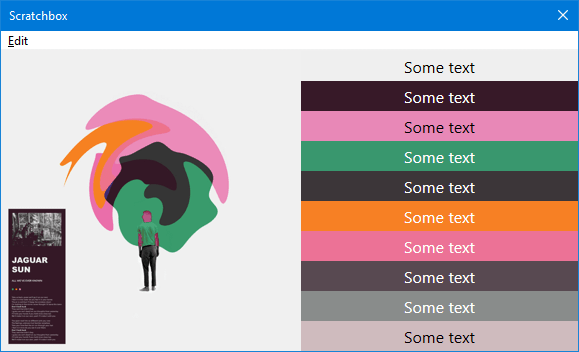
Example
'use strict';

include(fb.ComponentPath + 'helpers.js');

// Tracks playlist selection

var img = null;
var colours = [];
on_item_focus_change();

function on_item_focus_change() {
    if (img) {
        img = null;
    }

    colours = [];
    var metadb = fb.GetFocusItem();

    if (metadb) {
        img = metadb.GetAlbumArt(); // omitting the type defaults to front

        if (img) {
            colours = img.GetColourScheme(10);
        }
    }
    window.Repaint();
}

function on_paint(gr) {
    if (img && colours.length) {
        gr.DrawImage(img, 0, 0, 300, 300, 0, 0, img.Width, img.Height);

        colours.forEach(function (colour, i) {
            gr.FillRectangle(300, i * 30, window.Width - 300, 30, colour);

            /*
            The 2nd WriteTextSimple arg is the font. Leaving it as an empty string so defaults of Segoe UI and 16px are used.

            See helpers.js in the component directory for the DetermineTextColour function
            which calculates whether to use black or white for the text colour depending on
            the background colour.
            */
            gr.WriteTextSimple('Some text', '', DetermineTextColour(colour), 300, i * 30, window.Width - 300, 30, 2, 2);
        });
    }
}

function on_playlist_switch() {
    on_item_focus_change();
}
GetGraphics()#
Return an JsGraphics instance.
ReleaseGraphics()#
No return value.
Resize(width, height)#
| Arguments | ||
|---|---|---|
| width | number |
|
| height | number |
No return value.
SaveAs(path)#
| Arguments | ||
|---|---|---|
| path | string |
The parent folder must already exist. The image is saved as JPG so you should use that as the file extension. |
Returns a boolean value to indicate success.
StackBlur(radius)#
| Arguments | ||
|---|---|---|
| radius | number |
Valid values 2-254. |
No return value.
Example
include(fb.ComponentPath + 'helpers.js');

var img = utils.LoadImage(fb.ComponentPath + 'samples\\images\\1.webp');
var blur_img = null;
var radius = 20;

StackBlur(radius);

function StackBlur(radius) {
    blur_img = img.Clone();
    blur_img.StackBlur(radius);
}

function on_paint(gr) {
    gr.DrawImage(img, 0, 0, 550, 368, 0, 0, 550, 368);
    gr.DrawImage(blur_img, 0, 368, 550, 368, 0, 0, 550, 368);
    gr.FillRectangle(0, 0, window.Width, 24, RGB(0, 0, 0));
    gr.WriteText('Scroll mouse to change radius: ' + radius, '', RGB(255, 255, 255), 0, 0, window.Width, 24, 2, 0);
}

function on_mouse_wheel(step) {
    radius += step * 5;
    if (radius < 2)
        radius = 2;
    if (radius > 254)
        radius = 254;
    StackBlur(radius);
    window.Repaint();
}